
OfficeAI: A Virtual Office Run by a Team of AI Agents
A virtual-office platform where AI agents, each with its own role, work together on day-to-day operations. Our first example is warehouse and distribution, with five agents that watch stock, schedule trucks and update customers.
Every action that leaves the office waits for your approval, and everything is logged.
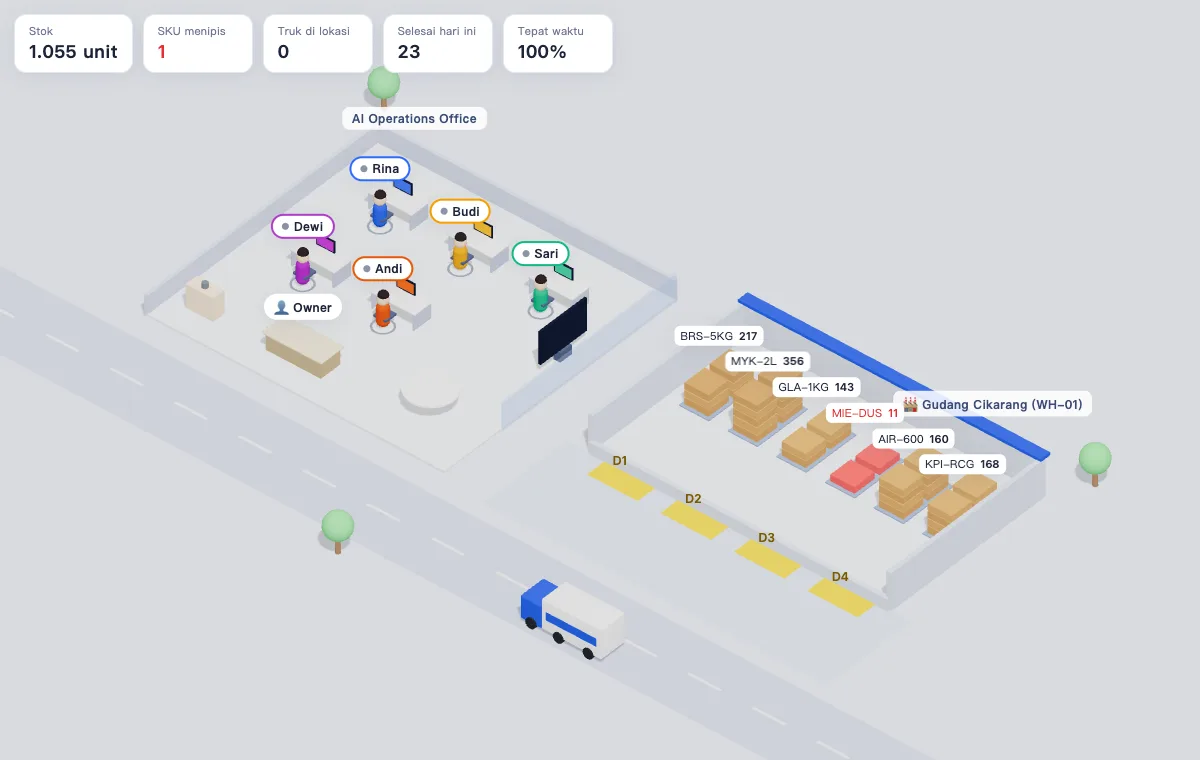
One office, several agents, one workflow
OfficeAI is not a single chatbot. It is designed as a small office of agents with different roles.
Reads the data you already use
Spreadsheets, order lists and chats. No need to switch software.
Splits up the work
One agent understands the request; others monitor, schedule or compile reports according to their roles.
Prepares actions, humans approve
Outgoing actions, such as purchase orders or messages to customers, wait for your approval and are logged in the activity log.
The routine warehouse work that most often slips
Stock-outs found too late
Best sellers run out when customers order, because nobody had time to check reorder points every day.
Trucks piling up at the gate
Loading docks sit empty while trucks wait, because scheduling runs on phone calls and memory.
Customers keep asking for status
Admins spend their time answering "where is my order?" on WhatsApp, one by one.
Meet the AI team for the warehouse
Each agent may only use the tools of its role. Purchasing cannot message customers, and Customer Service cannot create purchase orders.
Rina
Head of Operations
Understands your request, assigns work to teammates and summarizes warehouse conditions.
Budi
Purchasing
Watches stock against reorder points and prepares purchase orders for suppliers.
Sari
Dispatcher
Directs trucks from the gate to a free dock so queues do not build up.
Dewi
Finance
Reads KPIs such as stock, completed deliveries and on-time rate, and writes short reports.
Andi
Customer Service
Prepares delivery status updates for customers on WhatsApp.
How OfficeAI works
- 1
Connect to your data
Start from the stock spreadsheets and delivery lists you already use. No software switch needed.
- 2
The AI team works in view
Each agent walks to the terminal when reading data and to your desk when proposing something. Everything is logged.
- 3
Important actions wait for your approval
Purchase orders and customer messages are never sent before you press Approve, on laptop or phone.
- 4
Results reported in numbers
Stock-outs, truck queues, customer response time and admin hours saved are tracked every week.
Example from the demo
- alert Granulated Sugar 1kg is down to 129 packs, reorder point 140
- Budi checks inventory, then prepares a PO for 120 packs to the supplier
- You press Approve in the approval queue
- Supplier truck departs, enters a dock, and stock rises once unloading is done
Key features
Approval queue
POs and outgoing messages pile up as documents on the Owner desk. One click to approve or reject.
Low-stock autopilot
As soon as stock hits the reorder point, Purchasing evaluates it and prepares a PO.
Plain-language instructions
"Which stock is running low? Raise a PO." Just type it as you would brief a staff member.
Comfortable on a phone
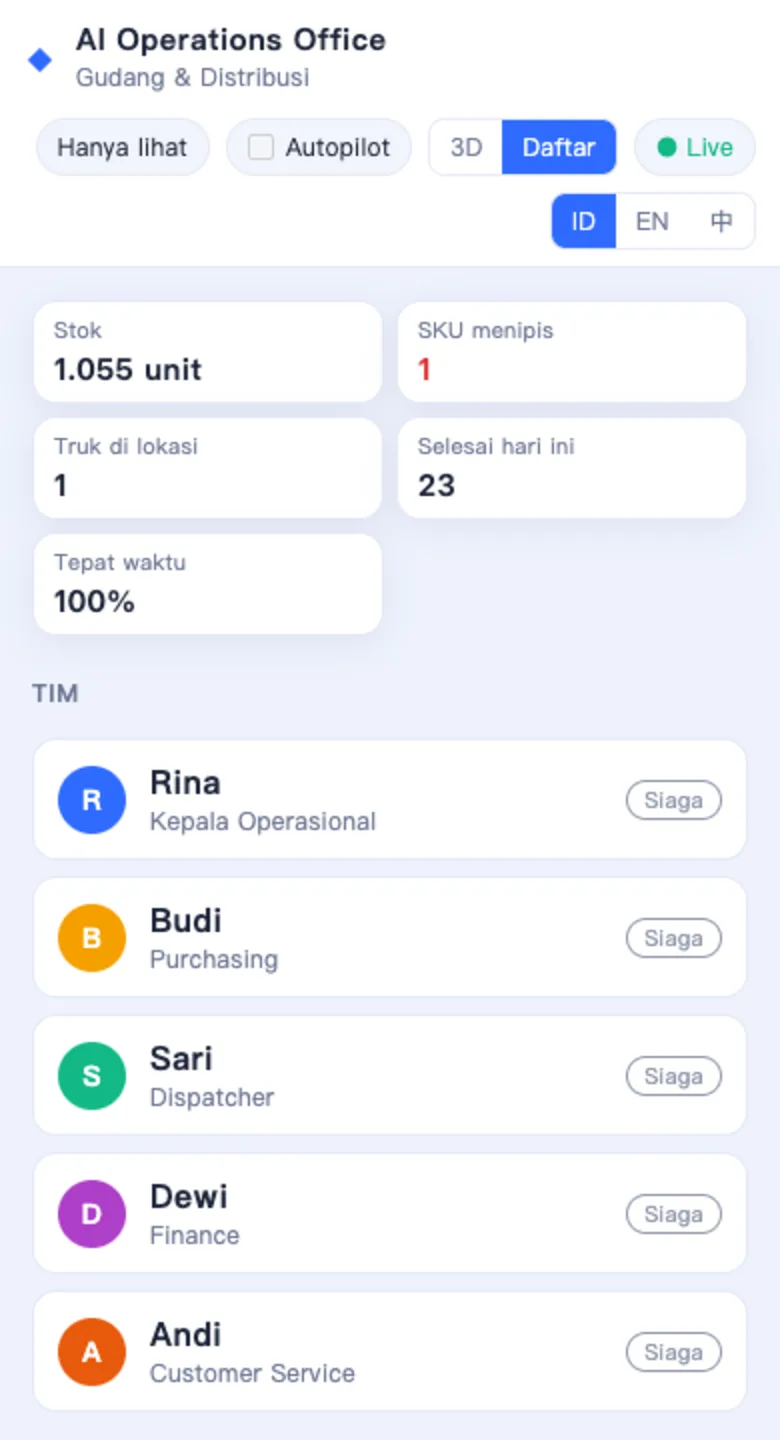
A light list view without 3D for monitoring KPIs and approving from anywhere.
Indonesian, English, 中文
The interface and agent replies are available in three languages.
Choice of AI brain
Claude for Indonesia, or Qwen and DeepSeek for operations in China.
Controlled access
An Owner token for instructions and approvals, a Viewer token for staff who only monitor.
Designed to be configured for other industries
Warehouse and distribution is the first demo vertical, the one we are offering now. The same agent framework, approval flow and interface are designed to be reconfigured for other industries. The others below are not running yet.
Warehouse & distribution
First demo verticalMulti-marketplace online store
Configurable nextF&B and central kitchen
PlannedClinics & appointment businesses
PlannedContinue from here
Frequently asked questions
What is OfficeAI?
OfficeAI is a virtual-office platform of AI agents, each with its own role, that work together on day-to-day operations. Agents read the data a company already uses, split up the work, and prepare actions that wait for human approval. All activity is logged. Our first example is warehouse and distribution: watching stock, preparing purchase orders, scheduling trucks and docks, reading KPIs, and preparing updates for customers.
Is OfficeAI only for warehouses?
No. Warehouse and distribution is the first demo vertical. The agent framework is designed to be reconfigured for other industries, but the other verticals are still at the planning stage.
Can the AI buy goods or send messages without my permission?
No. Actions that spend money or contact customers, such as purchase orders and WhatsApp messages, are only created as drafts in the approval queue. A draft runs only after the Owner presses Approve.
Do I have to replace my current software?
No. The pilot starts from data you already use, such as stock spreadsheets and delivery lists. Integration with an ERP or WMS can be added later.
How are data and access secured?
Each office is accessed with a token: Owner to instruct and approve, Viewer for staff who only monitor. Connections are encrypted and the server can only be reached through Cloudflare.
Which AI models are used?
OfficeAI can use Claude from Anthropic, or OpenAI-format models such as Qwen and DeepSeek for operations in China. The model is chosen together according to your needs and budget.
What does it cost and how do I try it?
OfficeAI is at pilot stage with a limited number of participants. Contact us on WhatsApp to request demo access and discuss pilot costs for the scale of your business.
Join the OfficeAI pilot
We are opening the pilot to a small number of warehouses and distributors. Tell us about your operations and we will prepare demo access and a pilot plan.